|
Add CALCULATED PRICING FIELDS TO A REPORT Overview
This document will show you how to add some calculated pricing fields to a custom report in SI5. Specifically, it will show how to add these fields for each line item: · Unit Price (including equipment adjustment and misc parts) · Unit Cost (works for bulk wire items) · Adjusted Price (Price + EquipmentAdjustment) · Extended Price (Adjusted Price + MiscParts) · Labor Rate (Labor Price / Labor Hours) Steps
1. Open a custom report and go to the Script tab 2. Add this script to the ActiveReport_DataInitialize event. This will add these data fields to the report. Sub ActiveReport_DataInitialize ‘Values are set in the ActiveReport_FetchData event rpt.Fields.Add("UnitEQPrice") rpt.Fields.Add("UnitEQCost") rpt.Fields.Add("ExtendedEQPrice") rpt.Fields.Add("AdjustedEQPrice") rpt.Fields.Add("LaborRate") End Sub 3. Add this script to the ActiveReport_FetchData event. This will cause these data fields to be populated when it is time to get a new item. Function ActiveReport_FetchData(ByVal EOF As Boolean) As Boolean 'this is needed to keep the report from crashing Dim ds As DataDynamics.ActiveReports.Datasources.XMLDatasource = ctype(rpt.Datasource, DataDynamics.ActiveReports.Datasources.XMLDatasource) If ds.EOF Then return True
' get the current item the report is on... Dim itm As DTools.SystemIntegrator.Reporting.Item = ReportUtilities.ReturnItem(rpt)
'calculate UnitEQPrice, ExtendedEQPrice, and AdjustedEQPrice
Dim EQPrice As Decimal = ctype(itm.Price, Decimal) Dim EQCost As Decimal = ctype(itm.Cost, Decimal) Dim EQAdj As Decimal = ctype(itm.EquipmentAdjustment, Decimal) Dim MiscParts As Decimal = ctype(itm.MiscPartsAdjustment, Decimal) Dim Qty As Decimal = ctype(itm.Quantity, Decimal)
Dim AdjEQPrice As Decimal = EQPrice + EQAdj Dim ExtEQPrice As Decimal = EQPrice + EQAdj + MiscParts Dim UnitEQPrice As Decimal = ExtEQPrice / Qty Dim UnitEQCost As Decimal = EQCost / Qty
'calculate LaborRate
Dim LaborHrs As Double = ctype(itm.InstallationHours,
Double) Dim LaborPrice As Double = ctype(itm.TotalLaborPrice, Double) Dim LaborRate As Double = LaborPrice / LaborHrs
'Store the calculated values rpt.Fields("UnitEQPrice").Value = UnitEQPrice rpt.Fields("UnitEQCost").Value = UnitEQCost rpt.Fields("ExtendedEQPrice").Value = ExtEQPrice rpt.Fields("AdjustedEQPrice").Value = AdjEQPrice rpt.Fields("LaborRate").Value = LaborRate
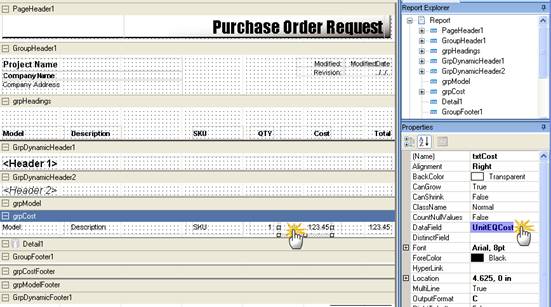
End Function 4. Go back to the Designer tab and select or create a textbox where you would like to store one of these values.
5. Change the DataField property for this textbox to the desired value, e.g. UnitEQCost. Can be used for individual items, or subtotals.
sample Report
A sample report can be downloaded here. Do not unzip – store to local drive and import using Reporting Center. http://downloads.d-tools.com/si5/reports/Fixes/Purchase_Order_v2.zip |