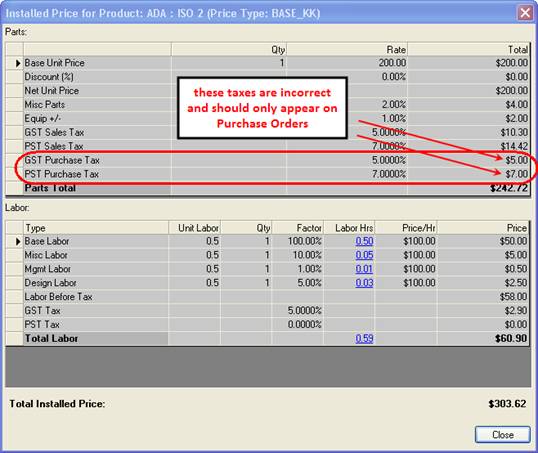
Canadian Purchase Tax Code Bug in SI5.2Applies toProjects using Canadian taxes where Purchase Tax Code is set. If do not use Canadian taxes, or have never set Purchase Tax Codes, you are not affected by this bug. Limited to SI5.2 reports and project totals. Does NOT affect SDK/Quicklinks/Tigerpaw usage (invoices, purchase orders). SummaryIn SI5.2, the Purchase Tax Code is incorrectly adding cost-based GST and PST taxes to the tax totals on proposals and other reports. This tax is calculated by multiplying the Cost of the item by the GST and PST percentages from the Purchase Tax Code definition. Its correct purpose is to appear on Purchase Orders only, but in SI5.2 it appears on all reports and price summaries. Fortunately, there is a fairly simple workaround. ExampleLet’s say there is a product with Cost = $100, Price = $200, and Purchase Tax Code (PTC) = ‘S’, where PTC=’S’ is defined as 5% GST and 7% PST. In this case, the Purchase Tax GST = $100 * 5% = $5 and the Purchase Tax PST = $100 * 7% = $7. These numbers are currently being added to the total PST and GST, making the project totals more than they should be. You will see this in many places, including: · In the installed price for every product · In the installed price summary for the entire project · In the PST and GST totals in the Project Summary on proposals · In the installed price totals in the project grid of the Navigator Basically, anywhere an installed price, tax, or project total is displayed.
SolutionClear the Purchase Tax Code from your project(s) by following these steps: 1. Open the project in Text 2. Go to the Columns/Grouping button and select the Canadian Purchase Tax checkbox 3. Use shift-select on the left-most column of the PDM to select all rows/items in project 4. Go into any cell in the Canadian Purchase tax column and select (blank) from the drop-down menu. This will clear all values for this field. 5. Save the project Consequences of this solutionNo negative effects. Purchase taxes will be gone from reports and summaries, but will still appear correctly on invoices and purchase orders when using Quicklinks, Tigerpaw or other SDK products. Additional SuggestionsIn order to avoid having to do this for future projects, it is recommended that you clear this field from your Master Table as well. To do this, open MMPD, go to the Product Grid and follow steps 2-4 above. Consequences of this actionPurchase Tax Code will no longer copy over to new items when you create new inventory items in Quickbooks using the Quicklinks interface. You can use Quickbooks to set the Purchase Tax Code later. Otherwise, there are no negative effects from clearing this field in your database. Long-term SolutionThis is a bug that will be fixed in our next product release. Forum DiscussionSee this forum thread for discussion of this issue: http://www.d-tools.us/showthread.php?t=2173 |